
Modern distributed systems are expected to handle sudden traffic spikes without downtime. Autoscaling solves part of that problem by automatically adding or removing compute resources based on demand. The hidden variable most teams underestimate is autoscaling reaction time.
Autoscaling reaction time is the delay between a load increase and the moment new capacity becomes available and ready to serve traffic. If this delay is too long, users experience latency spikes, timeouts, or cascading failures.
Understanding and optimizing this timing is critical for stable production systems.
What Is Autoscaling Reaction Time?
Autoscaling reaction time represents the total time required for an infrastructure platform to detect load and supply additional capacity.
In most cloud environments the timeline typically looks like this:
- Metrics detect increased load such as CPU usage or request rate.
- Monitoring systems evaluate scaling policies.
- The orchestration platform provisions new compute instances or containers.
- The new instances start, initialize dependencies, and pass health checks.
- Load balancers begin routing traffic to the new instances.
Each stage introduces latency. Combined together they form the full reaction window.
In practice, reaction time often ranges from 20 seconds to several minutes, depending on infrastructure design.
Why Reaction Time Breaks Systems
Autoscaling is often treated as a magic safety net. In reality it behaves more like a delayed response mechanism.
Imagine traffic suddenly doubling in under ten seconds. If scaling requires two minutes to provision new capacity, the system must survive that entire window with existing resources.
During this period several things may happen:
• request queues grow rapidly
• latency increases across services
• database connections saturate
• retries amplify traffic load
This phenomenon is commonly called a traffic amplification cascade, and it is responsible for many real production outages.
Autoscaling works only if systems can tolerate the delay.
Components That Determine Reaction Time
Several layers contribute to the overall scaling delay.
Metric Collection
Monitoring systems collect metrics in fixed intervals. Many default configurations scrape metrics every 30 to 60 seconds, which already introduces significant delay before scaling decisions begin.
Scaling Policy Evaluation
Scaling controllers evaluate whether thresholds are exceeded. Some systems require multiple consecutive samples before triggering a scaling event to avoid oscillations.
Resource Provisioning
This step varies significantly depending on infrastructure:
- Container scaling may take 5 to 20 seconds
- Virtual machine provisioning may take 1 to 3 minutes
Container orchestration platforms dramatically reduce reaction time compared to VM based scaling.
Application Startup Time
Applications rarely start instantly. Initialization tasks often include:
- database connection pools
- dependency injection containers
- cache warmups
- configuration loading
Poor startup performance can add 10 to 60 seconds before instances become ready.
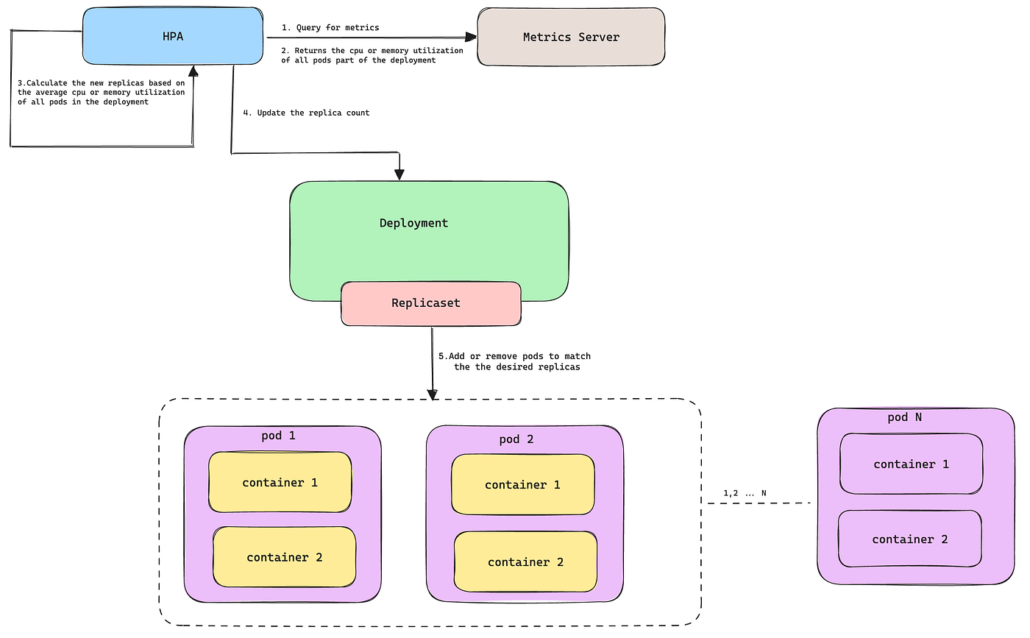
Autoscaling in Kubernetes
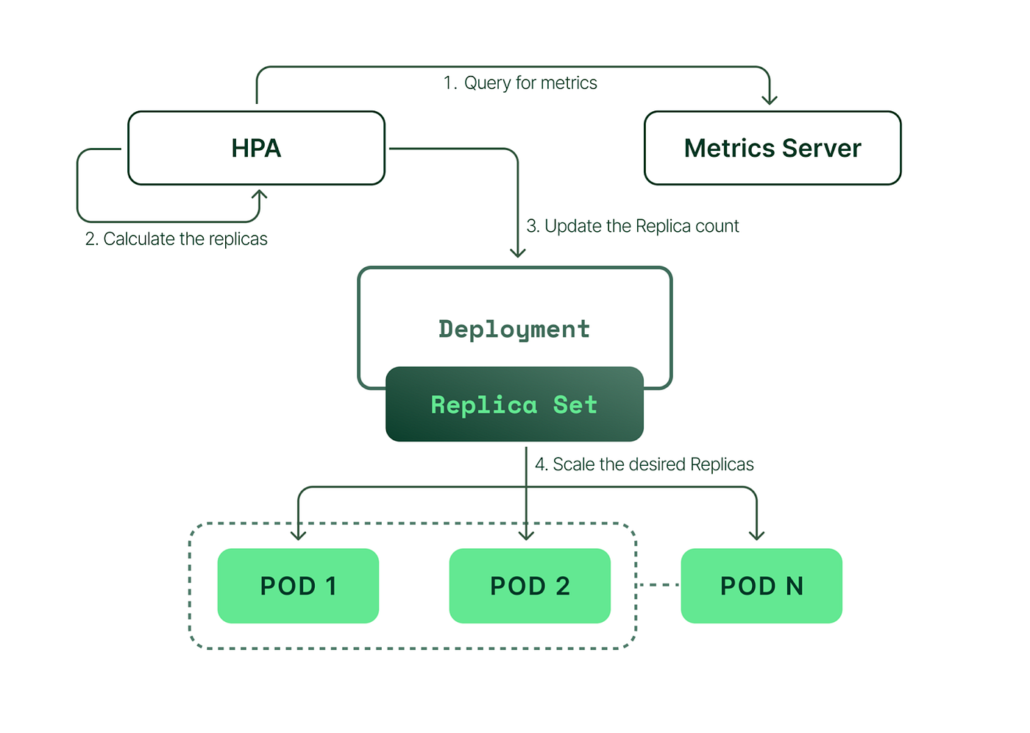
Kubernetes environments typically rely on the Horizontal Pod Autoscaler which scales pods based on metrics such as CPU utilization or custom metrics.
The reaction timeline normally looks like this:
- Metrics server collects resource usage
- Autoscaler controller evaluates thresholds
- New pods are scheduled onto cluster nodes
- Containers pull images and start
- Readiness probes pass
- Traffic is routed to the new pods
Even in optimized clusters the full process often takes 30 to 90 seconds.
Understanding this delay is essential when designing resilient services.
Strategies to Reduce Autoscaling Reaction Time
Improving reaction time requires work across infrastructure and application layers.
Faster Metrics
Reducing metric scrape intervals from 60 seconds to 10 or 15 seconds dramatically improves scaling responsiveness.
Predictive Scaling
Reactive autoscaling waits for problems to occur. Predictive scaling anticipates traffic based on historical patterns.
Common examples include:
- daily traffic peaks
- scheduled events
- marketing campaigns
Provisioning capacity before the spike removes the reaction delay entirely.
Lightweight Containers
Container image size and startup complexity strongly influence scaling speed.
Optimizations include:
- minimal base images
- faster dependency loading
- avoiding expensive startup scripts
Warm Capacity
Keeping a small buffer of unused compute resources allows systems to absorb spikes instantly while scaling catches up.
This technique is often called headroom capacity.
The Engineering Reality
Autoscaling is not instantaneous elasticity. It is a delayed response system operating under imperfect information.
Reliable cloud architectures assume scaling delays will happen and design systems that remain stable during that window.
Queues, rate limiting, circuit breakers, and backpressure mechanisms help services survive until new capacity becomes available.
Teams that treat autoscaling as a safety mechanism rather than a guarantee build systems that remain stable even during extreme load spikes.
Final Thoughts
Autoscaling reaction time is one of the most overlooked aspects of cloud architecture. Engineers focus heavily on scaling policies while ignoring the real operational constraint: how long the system must survive before scaling completes.
Design systems that tolerate the delay and autoscaling becomes powerful. Ignore it and autoscaling simply fails slower than manual intervention.